How to Register on UNGM: Step-by-Step Guide (2026)
Published July 4, 2026
The United Nations Global Marketplace (UNGM) is the shared procurement gateway used by more than 40 UN organizations, including UNDP, UNICEF, WFP, UNOPS, and WHO, representing over $22 billion in annual procurement. If you want to bid on a UN tender, registering on UNGM is the first step, and it's one most suppliers only do once. Getting it right the first time saves a surprising amount of back-and-forth later. Here's exactly how it works.
What is UNGM, and do you actually need to register?
UNGM is a single vendor database shared across the UN system. Instead of registering separately with UNICEF, then again with UNDP, then again with WFP, you register once on UNGM and your profile is visible to every participating agency. If you plan to respond to any UN tender (an RFP, ITB, RFQ, EOI, or RFI), you'll generally need at least a Basic UNGM registration first, since as of June 2024, vendors responding to UN Secretariat Requests for Information must log into UNGM to submit, even when the notice itself was published elsewhere.
Before you start: what to have ready
Registration goes faster if you gather this first:
- Your company's legal name exactly as it appears on your Certificate of Incorporation (or local equivalent). UNGM asks for this verbatim.
- A work email you check regularly. UNGM sends an activation link, and it sometimes lands in spam.
- Basic company details: registration number, country of registration, address, and primary business activity.
- A sense of which UNSPSC codes describe what you sell. You'll use these to control which tender alerts you receive.
Step-by-step: registering as a supplier
- Go to ungm.org and start a new registration. Select "Login and New Registrations," then "New registration." Choose "Companies" if you're registering a business or NGO (there's a separate path for individual consultants and UN staff).
- Enter your company details and accept the UN Supplier Code of Conduct. Use your company name exactly as it appears on your Certificate of Incorporation. Mismatches here are one of the most common reasons registrations get flagged for correction later.
- Activate your account. UNGM emails an activation link to the address you provided. Check your spam folder if it doesn't arrive within a few minutes. UN automated emails are frequently miscategorized by corporate spam filters.
- Complete the registration form. Once activated, click "Complete the registration" and fill in the required fields under "General": company profile, contact details, and the product/service categories (UNSPSC codes) that describe your business.
- Submit at the Basic level. Basic registration requires no supporting documentation, just accurate company information. Once submitted, you can begin participating in some UN procurement activity and receiving relevant tender alerts.
Basic vs. Full registration: which do you need?
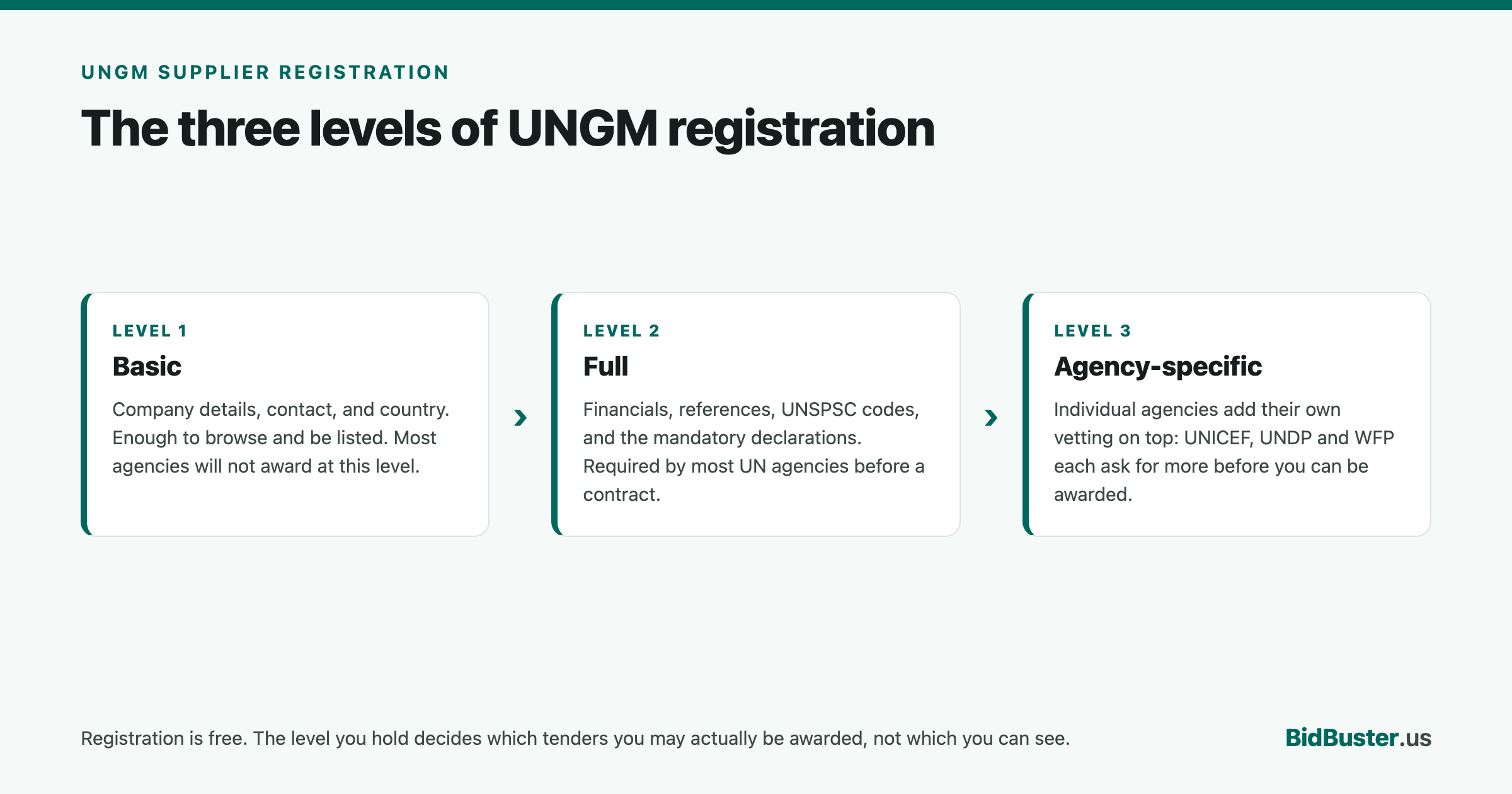
UNGM registration comes in tiers. Basic registration is free, fast, and requires no documents. It gets you into the directory and eligible for some tender notifications. Full registration requires additional supporting documentation (things like proof of registration, financial standing, and references) and is what most agencies require before you can actually be awarded a contract above a certain value. If you're serious about winning UN work rather than just monitoring it, plan to move to Full registration once your Basic profile is active. Don't wait until you've found a tender you want to bid on, since document review takes time you may not have once a deadline is already running.
Common mistakes that slow suppliers down
- Company name mismatches. Entering a trading name or abbreviation instead of the exact legal name on your incorporation documents is the single most common reason a registration gets kicked back for correction.
- Vague or missing UNSPSC codes. If your product/service codes don't accurately describe what you do, you'll either miss relevant tender alerts or get flooded with irrelevant ones.
- Treating Basic registration as the finish line. Basic gets you visible; it doesn't make you eligible to win most tenders. Budget time to complete Full registration before you need it.
- Ignoring the activation email. An unactivated registration simply doesn't exist yet from UNGM's side. Check spam, and confirm activation before assuming you're registered.
What happens after you're registered
Once you're registered, whether Basic or Full, the real work starts: monitoring notices that match your UNSPSC codes, deciding which are worth pursuing, and actually responding to them. UN tenders come with their own conventions that a generic RFP process doesn't account for. Notice types like RFP, ITB, RFQ, EOI, and RFI each carry different evaluation rules, many require a two-envelope technical/financial split, and most expect a PSEA declaration and Code of Conduct acknowledgment alongside whatever the tender itself asks for.
That's the layer BidBuster is built for: decoding a UN tender into a compliance matrix, handling the two-envelope split automatically, and tracking UN-specific requirements alongside whatever the solicitation states, so registration is the easy part and the response is where you actually save time.
Frequently asked questions
Is it free to register on UNGM?
Yes. Registering as a supplier on UNGM is free. Be cautious of any third party charging a fee to "register" you. Registration is done directly on ungm.org.
How long does UNGM registration take to approve?
Basic-level registration is typically available as soon as you complete the form, since it requires no supporting documentation. Full registration takes longer, since it depends on document review and, for some UN agencies, may require the agency itself to upgrade your status.
Do I need to register separately with each UN agency?
No. UNGM is a shared vendor database used by more than 40 UN organizations. A single UNGM registration is visible to all of them, though individual agencies may have their own additional vetting or agency-specific vendor rosters for certain categories of work.
What's the difference between Basic and Full registration on UNGM?
Basic registration only requires general company information and no supporting documents, and lets you appear in the directory and receive some tender alerts. Full registration requires additional documentation (such as registration certificates, financial information, and references) and is generally required to bid on tenders from agencies that require it.